
Every printer at a glance
One row for each printer with its state, job, progress and time left, and the control that fits. A count by state sits above the list, and details opens the full card.
ToolsDesign

Every 3D printer in one window
Queue G-code, see every printer at a glance and watch the part being drawn layer by layer as it prints. Marlin printers over USB work today; Moonraker, OctoPrint, PrusaLink and Bambu LAN are planned.
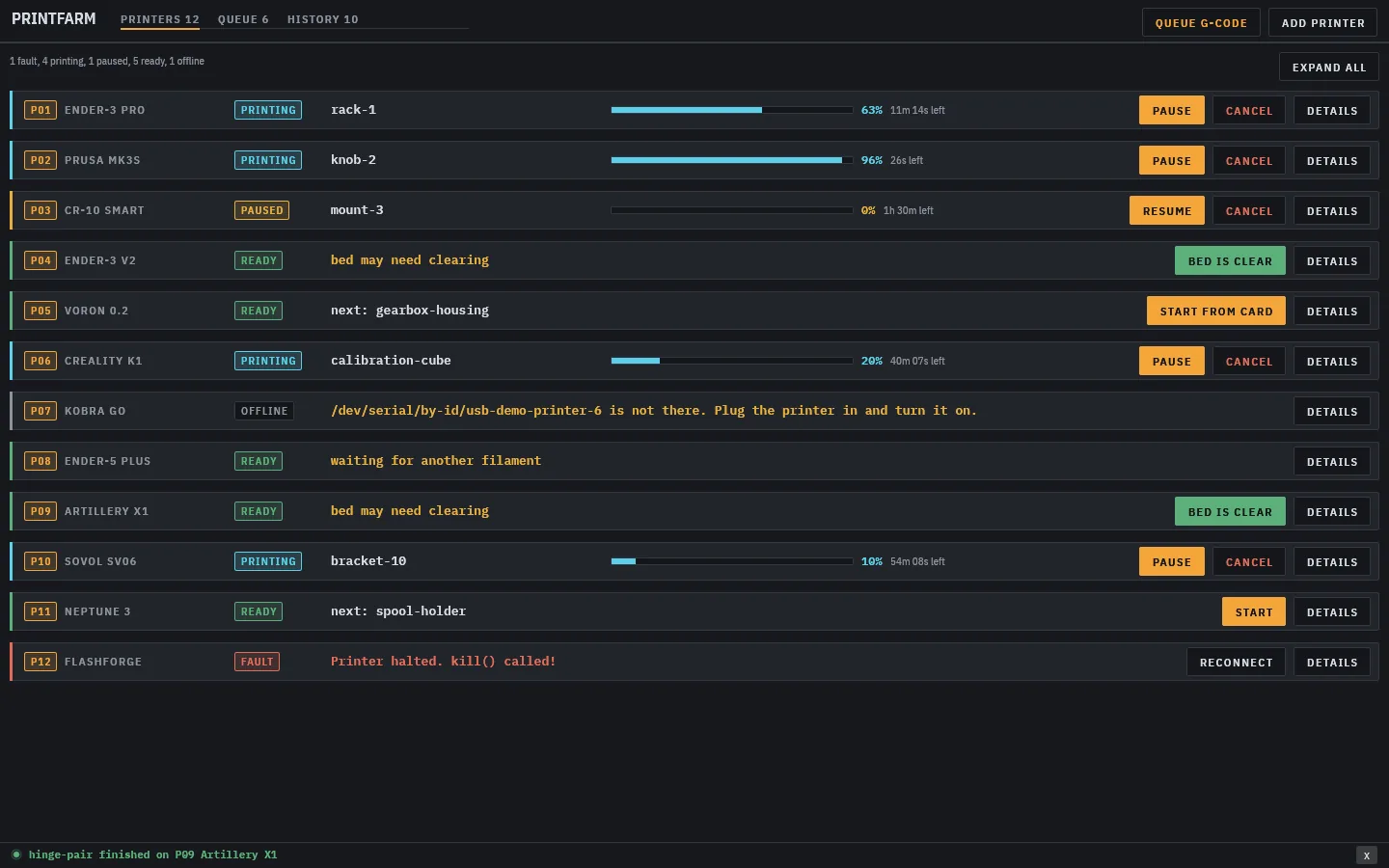
One row for each printer with its state, job, progress and time left, and the control that fits. A count by state sits above the list, and details opens the full card.
A job is copied to the printer’s SD card and printed from there, so closing printfarm or pulling the cable does not stop it. Open it again and it picks the print back up.
Drop G-code on the window. Every job shows the part, its time and filament, drawn from the G-code itself, and a 3D preview follows a running print bead by bead.
Temperatures, a camera, the bed mesh, the SD card files and a console for each printer, and a copy of the queue to a USB stick with names the firmware can open.
An agent can start printfarm on a G-code file to queue it. printfarm does not slice yet, so the file has to be sliced first.
Marlin over USBG-code from any slicerUSB sticksSD cards
.gcode.gco
Drop one of these on the Bench Suite window and it opens here.
